3. Debug Console
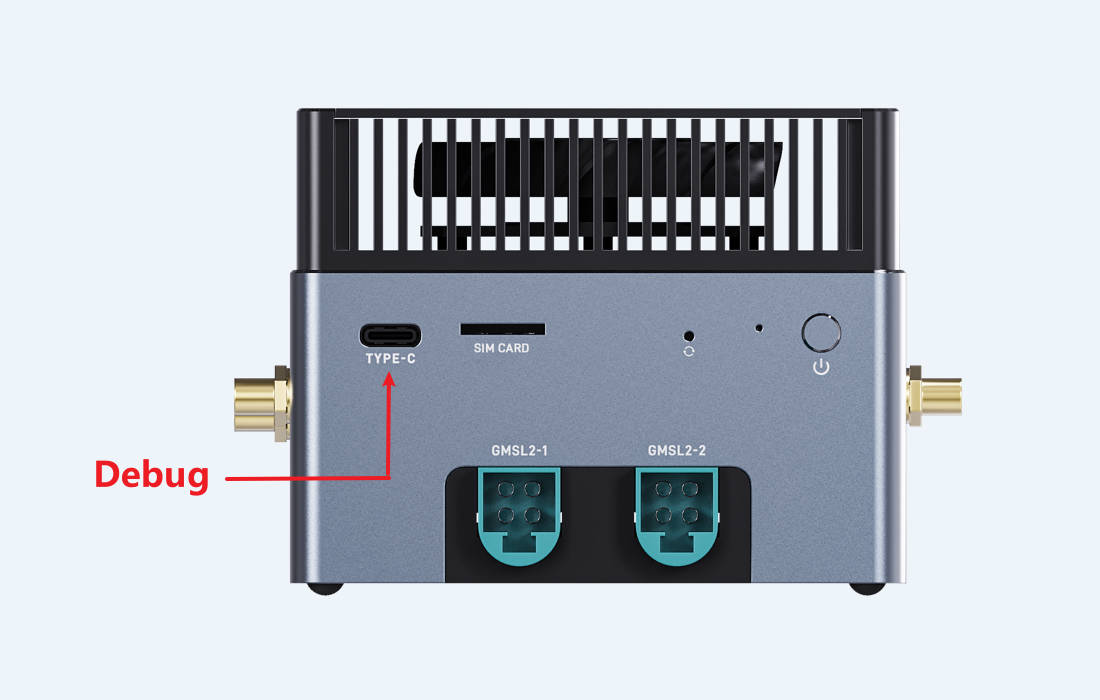
Debug serial port is very useful during debugging and troubleshooting, especially when the GUI is unavailable.
3.2. Install Driver
The serial-to-USB chip is CH342.
Linux PC don’t need to install driver.
Windows PC needs driver, please download CH343SER.EXE from Download Link
Double click the exe file to install.
3.3. Usage
After driver installation, you will find two serial port “USB-Enhanced-SERIAL-A CH342” and “USB-Enhanced-SERIAL-A CH342” in Windows device manager.
The SERIAL-A is the debug port of main Linux system, and the SERIAL-B is the debug port of RTOS subsystem.
In Linux it will be /dev/ttyUSBX or /dev/ttyACMX, the number X may be different, you can unplug and plug again to find the corresponding device.
Use the serial tool like MobaXterm or Minicom to open the serial device, baudrate is 115200, 8 data bit, 1 stop bit, no parity check.