12. Sound Card
12.1. EarPhone && Speak
Both EarPhone and Speak are dual-channel interfaces
Use the aplay command to play audio in wav format
#path-to indicates the absolute path to store the audio
aplay /path-to/audio-name.wav
If ALSA has not set the default device or there is a configuration error, directly using aplay will not enable playback. It is necessary to specify the correct sound card in order to play.
aplay -D hw:0,0 /path-to/audio.wav
If you want to set the default device, you can create an asound.conf file in the /etc/ directory and enter the following content.
pcm.!default {
    type plug
    slave {
        pcm "hw:0,0"
    }
}

ctl.!default {
    type hw
    card 0
}
12.2. Mic
RV1126B features ADC0 (PMU) and ADC1, supporting up to 4‑channel recording. The RV1126BJD4 carrier board provides two MIC interfaces: MIC2 is connected to ADC0, and MIC1 is connected to ADC1.
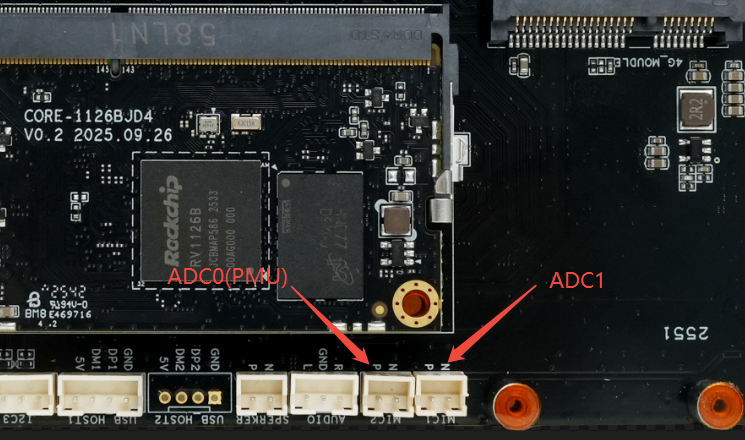 The firmware enables 4‑channel recording by default; 2‑channel recording defaults to the MIC2 interface. Recording is not enabled by default and must be activated manually.
The following steps enable recording on ADC0 (i.e., MIC2). If ADC1 is also enabled, 4‑channel recording becomes available. Playback of 4‑channel audio requires playback equipment that supports 4‑channel output.
The firmware enables 4‑channel recording by default; 2‑channel recording defaults to the MIC2 interface. Recording is not enabled by default and must be activated manually.
The following steps enable recording on ADC0 (i.e., MIC2). If ADC1 is also enabled, 4‑channel recording becomes available. Playback of 4‑channel audio requires playback equipment that supports 4‑channel output.Enabling MIC2
amixer -c 1 cset name='ACodec ADC Switch' 1                     # Enable ADC0
amixer -c 1 cset name='ACodec Digital Gain Volume' 127          # Set ADC0 digital gain to maximum. Range: 0 (min) – 127 (max)
amixer -c 1 cset name='ACodec PGA Gain Volume' 31               # Set ADC0 analog gain to maximum
Enabling MIC2
amixer -c 1 cset name='ACodec_LP ADC Switch' 1                  # Enable ADC1
amixer -c 1 cset name='ACodec_LP Digital Gain Volume' 127       # Set ADC1 digital gain to maximum. Range: 0 (min) – 127 (max)
amixer -c 1 cset name='ACodec_LP PGA Gain Volume' 31            # Set ADC1 analog gain to maximum
If only 2‑channel recording is desired—i.e., selecting either MIC1 or MIC2 for 2‑channel audio—manual switching is required. By default, the system uses MIC2 for 2‑channel recording. To switch to MIC1 for 2‑channel recording, the PATH input source must be changed.
For MIC1
amixer -c 1 cset name='SAI2 Receive PATH0 Source Select' 1
amixer -c 1 cset name='SAI2 Receive PATH1 Source Select' 0
For MIC2
amixer -c 1 cset name='SAI2 Receive PATH0 Source Select' 0      # Default
amixer -c 1 cset name='SAI2 Receive PATH1 Source Select' 1      # Default
Mic records audio
arecord -l											                #View all available MIC devices.
arecord -Dhw:1,0 -f cd -d 10 /path-to/audio.wav	#Select the sound card and record audio.
#Note: Mic only supports mono recording
For more detailed configuration information about the RV1126B acodec, please download the “RV1126B acodec Configuration Document” (https://www.t-firefly.com/doc/download/333.html#other_932) for reference.