
一、Product Introduction
Product Overview
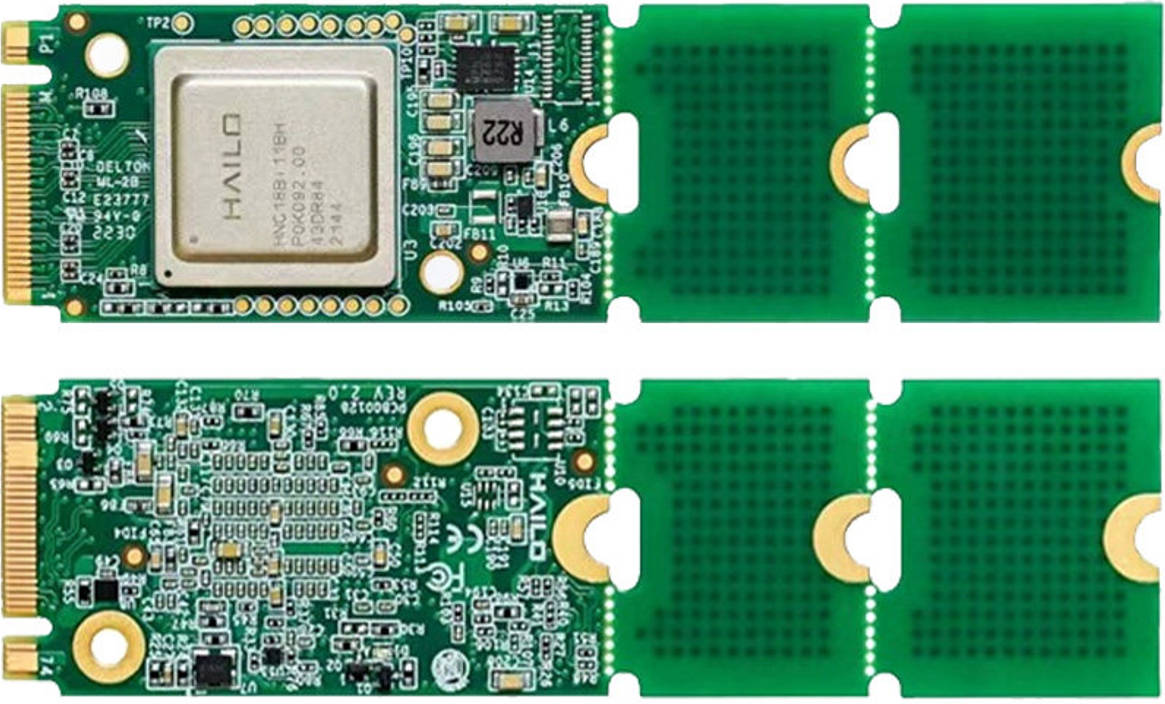
The Hailo-8 is an AI accelerator chip designed specifically for edge computing, offering up to 26 TOPS of computing power with a power consumption of only approximately 2.5W. It supports industrial-grade environments (-40°C to +85°C) and is suitable for deploying deep learning inference in embedded devices, industrial control systems, smart security, and IoT scenarios.
Key Features
Computing power: Up to 26 TOPS (INT8), suitable for running complex deep learning models.
Power consumption: Typical TDP is approximately 2.5W, significantly lower than comparable GPU/FPGA solutions, making it suitable for low-power edge devices.
Interface: Supports PCIe Gen3 x4 high-speed interface, with a modular design (B2B connector) for easy integration into custom carrier boards.
Compatibility: Supports mainstream frameworks such as TensorFlow, PyTorch, ONNX, Keras, and TFLite.
Multi-stream inference: Supports parallel processing of multiple models and real-time inference on multiple video streams, suitable for scenarios such as security monitoring and industrial inspection.
Industrial-grade design: Operating temperature range of -40°C to +85°C, meeting the demands of harsh environments.
Storage architecture: Built-in storage, eliminating the need for external DRAM, improving power efficiency and integration.
Detailed specifications
| name | parameter |
|---|---|
| model | Hailo-8 |
| Certification | CE、FCC Class A |
| Storage temperature | -40°C-85°C |
| Operating temperature | -40°C-85°C |
| Storage/Operating Humidity | 5%RH~90%RH(No condensation) |
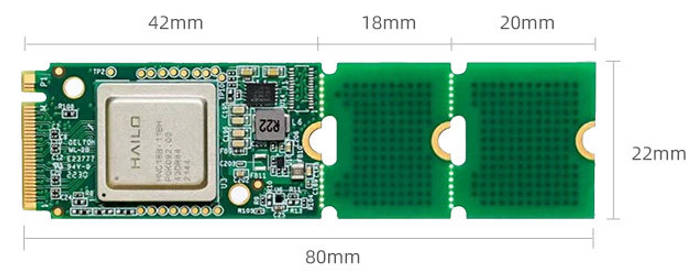
| Interface type | M.2 Key M |
| Physical dimensions | 22x42/22x60/22x80mm |
| Power supply | 3.3V±5% |
| Thermal design power(TDP) | 8.65w |
| interface | PCIe Gen3,4-lanes(x4) |
| Optimal performance(INT8) | 26TOPS |
二、Instructions for use
The Firefly adaptation materials can be obtained via email. Please send your order number to sales@t-firefly.com and specify that you need the Hailo-8 materials.
deploy
Supported platforms: RK3576, RK3588
Linux
Confirm that the Hailo-8 driver is currently installed.
root@firefly:/# find /boot/lib/modules/ -name "hailo*"
/boot/lib/modules/6.1.141/kernel/drivers/hailort-drivers
/boot/lib/modules/6.1.141/kernel/drivers/hailort-drivers/linux/pcie/hailo_pci.ko
Install the Firefly adapter package and reboot.
sudo dpkg -i hailort_4.21.0_arm64.deb
sudo dpkg -i hailo8-firefly-1.0.0_arm64.deb
sudo reboot
Confirm loading logs
root@firefly:/home/firefly# dmesg | grep hailo
[    7.351925] hailo: Init module. driver version 4.21.0
[    7.352293] hailo 0000:01:00.0: Probing on: 1e60:2864...
[    7.352311] hailo 0000:01:00.0: Probing: Allocate memory for device extension, 13192
[    7.352341] hailo 0000:01:00.0: enabling device (0000 -> 0002)
[    7.352361] hailo 0000:01:00.0: Probing: Device enabled
[    7.352403] hailo 0000:01:00.0: Probing: mapped bar 0 - 00000000c54dae26 16384
[    7.352415] hailo 0000:01:00.0: Probing: mapped bar 2 - 00000000f53033c3 4096
[    7.352424] hailo 0000:01:00.0: Probing: mapped bar 4 - 00000000b4d789a1 16384
[    7.352436] hailo 0000:01:00.0: Probing: Setting max_desc_page_size to 4096, (page_size=4096)
[    7.352454] hailo 0000:01:00.0: Probing: Enabled 64 bit dma
[    7.352460] hailo 0000:01:00.0: Probing: Using userspace allocated vdma buffers
[    7.352471] hailo 0000:01:00.0: Disabling ASPM L0s
[    7.352489] hailo 0000:01:00.0: Successfully disabled ASPM L0s
[    7.352617] hailo 0000:01:00.0: Writing file hailo/hailo8_fw.bin
[    7.418141] hailo 0000:01:00.0: File hailo/hailo8_fw.bin written successfully
[    7.418174] hailo 0000:01:00.0: Writing file hailo/hailo8_board_cfg.bin
[    7.418297] hailo 0000:01:00.0: File hailo/hailo8_board_cfg.bin written successfully
[    7.418310] hailo 0000:01:00.0: Writing file hailo/hailo8_fw_cfg.bin
[    7.418359] hailo 0000:01:00.0: File hailo/hailo8_fw_cfg.bin written successfully
[    7.516682] hailo 0000:01:00.0: NNC Firmware loaded successfully
[    7.516728] hailo 0000:01:00.0: FW loaded, took 164 ms
[    7.531865] hailo 0000:01:00.0: Probing: Added board 1e60-2864, /dev/hailo0
Android
Firefly currently supports two versions: Android 14 for RK3576 and Android 12 for RK3588. For deployment, you can refer to the Android-specific documentation provided by Firefly, or follow the official Hailo-8 documentation. After deployment, please verify that the module is recognized; you can refer to the “Confirm Loading Logs” step in the Linux deployment instructions for verification.
三、performance
PCIe 2.0 x2
root@firefly:/usr/local# hailortcli run /usr/local/yolov8n.hef
Running streaming inference (/usr/local/yolov8n.hef):
  Transform data: true
    Type:      auto
    Quantized: true
Network yolov8n/yolov8n: 100% | 1008 | FPS: 201.33 | ETA: 00:00:00
> Inference result:
 Network group: yolov8n
    Frames count: 1008
    FPS: 201.34
    Send Rate: 1979.29 Mbit/s
    Recv Rate: 1966.92 Mbit/s
PCIe 3.0 x4
root@firefly:/usr/local# hailortcli run /usr/local/yolov8n.hef
Running streaming inference (/usr/local/yolov8n.hef):
  Transform data: true
    Type:      auto
    Quantized: true
Network yolov8n/yolov8n: 100% | 2814 | FPS: 562.12 | ETA: 00:00:00
> Inference result:
 Network group: yolov8n
    Frames count: 2814
    FPS: 562.14
    Send Rate: 5526.08 Mbit/s
    Recv Rate: 5491.54 Mbit/s
Note: The module achieves optimal performance with a PCIe 3.0 x4 interface, while most Firefly M.2 interfaces are PCIe 2.0 x2. Please evaluate performance based on test data. Adequate cooling is also important, as insufficient cooling can lead to performance degradation.