
一、产品介绍
产品简介
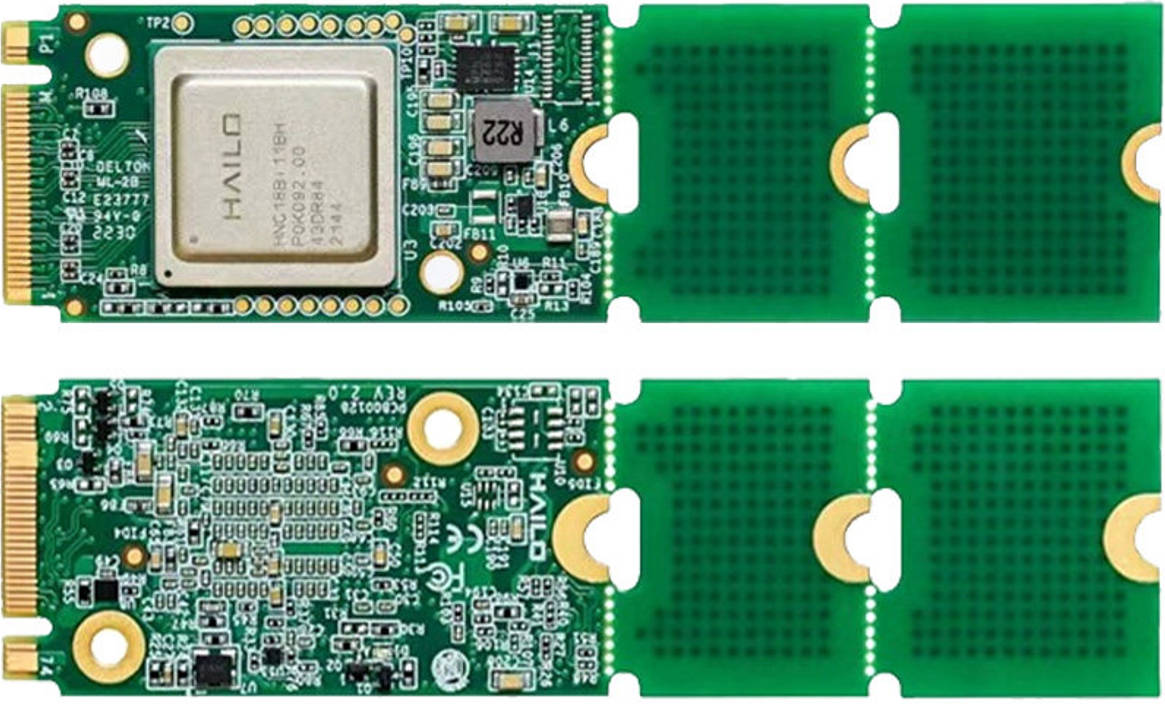
Hailo-8 是一款专为边缘计算设计的 AI 加速芯片,提供高达 26 TOPS 的算力,功耗仅约 2.5W,支持工业级环境(-40°C 至 +85°C),适合在嵌入式设备、工业控制、智能安防和 IoT 场景中部署深度学习推理
核心特点
算力:最高可达 26 TOPS (INT8),适合运行复杂的深度学习模型。
功耗:典型 TDP 约 2.5W,远低于同类 GPU/FPGA 方案,适合低功耗边缘设备。
接口:支持 PCIe Gen3 x4 高速接口,模块化设计(B2B 连接器),方便集成到定制载板。
兼容性:支持 TensorFlow、PyTorch、ONNX、Keras、TFLite 等主流框架。
多流推理:支持 多模型并行、多视频流实时推理,适合安防监控、工业检测等场景。
工业级设计:工作温度范围 -40°C ~ +85°C,满足严苛环境需求。
存储架构:内置存储,无需外部 DRAM,提升能效和集成度
详细参数
| 名称 | 参数 |
|---|---|
| 型号 | Hailo-8 |
| 认证 | CE、FCC Class A |
| 存储温度 | -40°C-85°C |
| 工作温度 | -40°C-85°C |
| 存储/操作湿度 | 5%RH~90%RH(无凝结) |
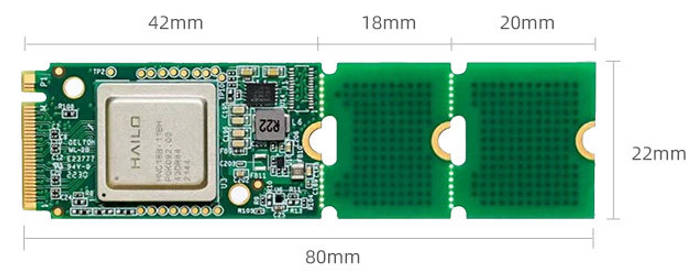
| 接口类型 | M.2 Key M |
| 物理尺寸 | 22x42/22x60/22x80mm |
| 电力供应 | 3.3V±5% |
| 热设计功率(TDP) | 8.65w |
| 接口 | PCIe Gen3,4-lanes(x4) |
| 最佳性能(INT8) | 26TOPS |
二、使用方法
firefly适配资料通过邮件的方式获取,把订单号发送到sales@t-firefly.com邮箱并注明需获取Hailo-8资料
部署
适配平台:RK3576,RK3588
Linux
确认当前存在hailo-8驱动
root@firefly:/# find /boot/lib/modules/ -name "hailo*"
/boot/lib/modules/6.1.141/kernel/drivers/hailort-drivers
/boot/lib/modules/6.1.141/kernel/drivers/hailort-drivers/linux/pcie/hailo_pci.ko
安装firefly适配包并重启
sudo dpkg -i hailort_4.21.0_arm64.deb
sudo dpkg -i hailo8-firefly-1.0.0_arm64.deb
sudo reboot
确认加载日志
root@firefly:/home/firefly# dmesg | grep hailo
[    7.351925] hailo: Init module. driver version 4.21.0
[    7.352293] hailo 0000:01:00.0: Probing on: 1e60:2864...
[    7.352311] hailo 0000:01:00.0: Probing: Allocate memory for device extension, 13192
[    7.352341] hailo 0000:01:00.0: enabling device (0000 -> 0002)
[    7.352361] hailo 0000:01:00.0: Probing: Device enabled
[    7.352403] hailo 0000:01:00.0: Probing: mapped bar 0 - 00000000c54dae26 16384
[    7.352415] hailo 0000:01:00.0: Probing: mapped bar 2 - 00000000f53033c3 4096
[    7.352424] hailo 0000:01:00.0: Probing: mapped bar 4 - 00000000b4d789a1 16384
[    7.352436] hailo 0000:01:00.0: Probing: Setting max_desc_page_size to 4096, (page_size=4096)
[    7.352454] hailo 0000:01:00.0: Probing: Enabled 64 bit dma
[    7.352460] hailo 0000:01:00.0: Probing: Using userspace allocated vdma buffers
[    7.352471] hailo 0000:01:00.0: Disabling ASPM L0s
[    7.352489] hailo 0000:01:00.0: Successfully disabled ASPM L0s
[    7.352617] hailo 0000:01:00.0: Writing file hailo/hailo8_fw.bin
[    7.418141] hailo 0000:01:00.0: File hailo/hailo8_fw.bin written successfully
[    7.418174] hailo 0000:01:00.0: Writing file hailo/hailo8_board_cfg.bin
[    7.418297] hailo 0000:01:00.0: File hailo/hailo8_board_cfg.bin written successfully
[    7.418310] hailo 0000:01:00.0: Writing file hailo/hailo8_fw_cfg.bin
[    7.418359] hailo 0000:01:00.0: File hailo/hailo8_fw_cfg.bin written successfully
[    7.516682] hailo 0000:01:00.0: NNC Firmware loaded successfully
[    7.516728] hailo 0000:01:00.0: FW loaded, took 164 ms
[    7.531865] hailo 0000:01:00.0: Probing: Added board 1e60-2864, /dev/hailo0
Android
Firefly 目前已适配 RK3576 的 Android 14 和 RK3588 的 Android 12 两个版本。部署时可参考 Firefly 提供的 Android 部分资料,或依据 Hailo-8 官方文档自行操作。完成部署后,请确认模块是否被识别,可参照 Linux 部署中的“确认加载日志”步骤进行验证。
三、性能
PCIe 2.0 x2
root@firefly:/usr/local# hailortcli run /usr/local/yolov8n.hef
Running streaming inference (/usr/local/yolov8n.hef):
  Transform data: true
    Type:      auto
    Quantized: true
Network yolov8n/yolov8n: 100% | 1008 | FPS: 201.33 | ETA: 00:00:00
> Inference result:
 Network group: yolov8n
    Frames count: 1008
    FPS: 201.34
    Send Rate: 1979.29 Mbit/s
    Recv Rate: 1966.92 Mbit/s
PCIe 3.0 x4
root@firefly:/usr/local# hailortcli run /usr/local/yolov8n.hef
Running streaming inference (/usr/local/yolov8n.hef):
  Transform data: true
    Type:      auto
    Quantized: true
Network yolov8n/yolov8n: 100% | 2814 | FPS: 562.12 | ETA: 00:00:00
> Inference result:
 Network group: yolov8n
    Frames count: 2814
    FPS: 562.14
    Send Rate: 5526.08 Mbit/s
    Recv Rate: 5491.54 Mbit/s
注:模块在PCIe 3.0 x4接口下可实现最佳性能,而Firefly多数 M.2 接口为PCIe 2.0 x2,请结合测试数据评估。另需注意散热,散热不足也会导致性能下降。